Understanding Python variables is the first step to mastering Python! This beginner’s guide breaks down the concept, explains key characteristics, and covers the essential rules for using variables in your code. Let’s dive in!

Definition of a variable
A variable is a piece of information which value can be changed overtime.
For a practical example of a variable, let’s consider something that everyone in the word has (or not)… Savings.
Think about it this way: today you could have $20 in your savings account, but tomorrow, due to a withdrawal or expense, that value might be just $0.07. Both $20 and $0.07 represent the same variable, “your savings,” but the value it contains is different at different points in time. This perfectly demonstrates the dynamic nature of variables in programming, just like in real life.
How do Python variables work?
When you assign a value to a variable, Python creates an object in memory and the variable acts as a reference to that object. For example:
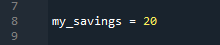
Your savings can be represented as my_savings in Python, if for example you have $20, it can be seen as follows.
Savings is just one illustration. Python variables can also represent age, salary, population, temperature, and importantly, store non-numeric data. The following section defines the different types of variables.
Different types of variables
Python’s flexibility extends to its variables, which aren’t limited to numerical values. It supports a wide range of data types, as shown below:
- Integer (int): Represents whole numbers, positive or negative, without decimals.
Example:
age = 25 salary = 3200 temperature = 25 - Floating-Point (float): Represents numbers with decimals.
Example:
price = 99.99 GPA = 2.3 pi = 3.14159 - String (str): Stores sequences of characters, enclosed in single or double quotes.
Example:
name = “Flower” last_name = ‘Hive’ - Boolean (bool): Stores either True or False, often used for conditional logic.
Example:
is_active = True is_expensive = False - List (list): An ordered, mutable collection that can store multiple data types.
Example:
fruits = [“apple”, “banana”, “cherry”] baby_names = [“Chuck”, “Razor”, “Mildred”]
These data types form part of the foundation of Python programming, allowing flexibility in handling different types of information. There are more types that I hope to share with you in the future.
It’s usually easy to see what type of data is inside a Python variable. However, naming your variables well is important to avoid problems later on, and to keep your code working correctly even if Python changes. Don’t worry, you can start with simple names! But reading the next part will give you tips to help you avoid some common mistakes when naming your Python variables.
Python Variable Names: Important Limitations to Know
When declaring a variable name in Python, you need to consider several limitations to ensure your code runs correctly and remains readable. Here are the key limitations:
1. Must Begin with a Letter or Underscore (_)
- ✅ Valid:
my_variable,_temp,Var1 - ❌ Invalid:
1variable,@var,#name
2. Can Only Contain Letters, Numbers, and Underscores
- ✅ Valid:
var_1,data_set,x1_y2 - ❌ Invalid:
var-1,data.set,x@y
3. Case-Sensitive
Python distinguishes between uppercase and lowercase letters.
- ⚠️
myVar,myvar, andMYVARare different variables.
4. Avoid Using Built-in Function Names
Python has built-in function names that you should avoid using as variable names.
- ❌ Invalid (not an error but can cause issues):
list = [1,2,3] - ✅ Use a different name:
my_list =[1,2,3]
This might cause errors later, because ‘list’ will become a variable and will not be a function.
5. Should Be Meaningful
Using meaningful names improves code readability.
- ✅ Good:
total_sales,user_count - ❌ Bad:
x,a1,data123
6. No Special Characters or Spaces
- ❌ Invalid:
my variable,total$amount - ✅ Use underscores instead:
my_variable,total_amount
7. Cannot Be a Python Keyword
Python has reserved keywords that cannot be used as variable names. For example:
- ❌ Invalid: if , class , def
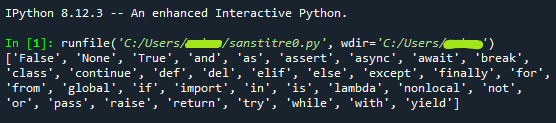
If you want to see all the “words that are “forbiden” variable names, you have just to use the following lines of code:

It will give as a result a list of the different words that cannot be used as a variable:
Conclusion
Python variables allow you to store and manipulate data efficiently. Whether you’re working with numbers, text, or collections, Python provides a flexible way to manage variables. By following best practices, you can write clean and optimized code.
This was my first blog. What do you think of it? Did I do well?
What should be the next post?
Leave me a comment.
🙂
Leave a Reply